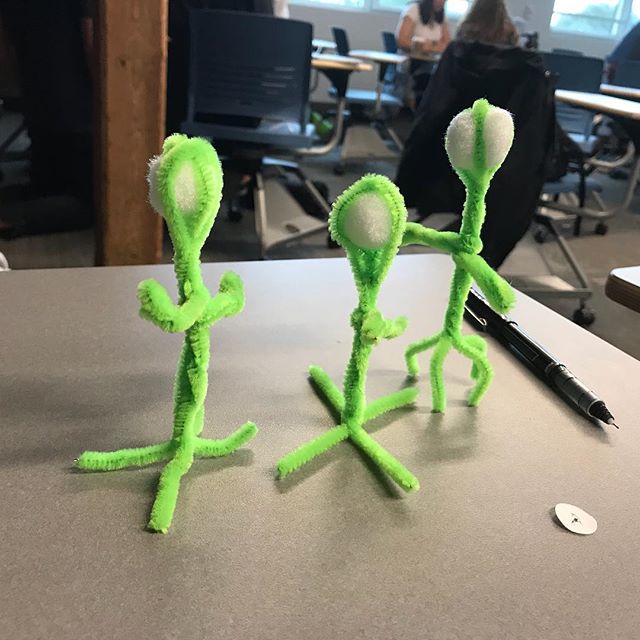
The above image was originally posted on my Instagram account and I have used IFTTT from http://www.ifttt.com to create an applet to automatically post my Instagram image as a blog post in my WordPress blog site.
I followed the following steps.

STEP 1
I went to http://www.ifttt.com and logged in with my Google account.
STEP 2
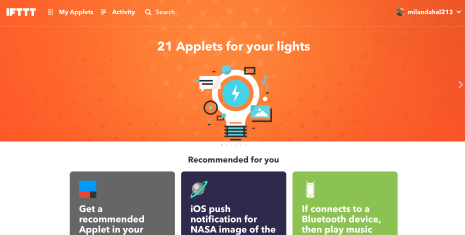
I clicked on My Applets on the top left and clicked on New Applet on the new screen. I landed on a new page.
STEP 3

I clicked on the  sign and it asked me to choose a service as a trigger.
sign and it asked me to choose a service as a trigger.STEP 4

There are hundreds of services to choose from. I chose Instagram and selected Any new photo by you as my trigger.
STEP 5

I clicked on  again and it asked me to select an action service. I chose WordPress because that is where my blog is.
again and it asked me to select an action service. I chose WordPress because that is where my blog is.STEP 6
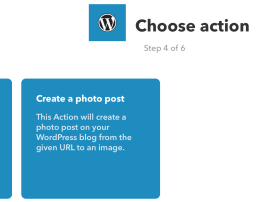
I chose Create a photo post action. This will create a photo post on my WordPress blog from the Instagram. I clicked on Create Action on the following screen.
STEP 7
I clicked Finish to create the IFTTT applet.
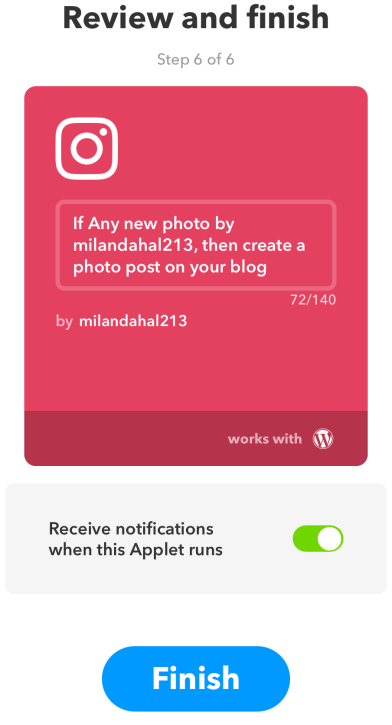

Now whenever I post an image on Instagram it automatically gets posted on my website as a blog post.
We can use the same process to create number of triggers and actions. I have automated twitter to send me a notification whenever the president tweets and I have also created an applet that sends me notification whenever the ISS is over my head. Pretty cool !!!
Learn more about it here:
 milan101
Leave a comment